Saturday, 23 March 2019

Guide: 3D Printing from Minecraft: Education Edition

This post it more of a set of instructions for others to follow if they want to pursue this. Think of it as a guide, not a set of rules, but what I have found works.

There is an inbuilt way of getting 3D data out of Minecraft: Education Edition with structure blocks, and these work great, if the builds are smaller than 32 blocks cubed. This process is quite convoluted (and I don't fully understand it yet) however, because of the size restrictions on the structure block export, I choose to use a different method, and while it unfortunately still requires access to a windows machine to work it does provide unlimited sized exports for 3D printing. I am yet to find a mac/iPad workaround, but I continue to search and will update accordingly, or likely write a whole new guide if I manage to find it!

The first step is to have something built, I am not going to provide any guidelines here, go build something you want to 3D print, or grab a world that a student has built in and use that. Either way, you need to export the world from M:EE. To do this click the 'pencil'  beside the world name BEFORE you enter it. Scroll all the way to the bottom and there is an 'Export World' button.

Export the world somewhere useful, it defaults to documents normally on a Windows machine. Now browse to the exported file and rename it to .zip instead of .mcworld and extract the files. If you cannot see the file extensions, in the 'View' tab of Windows Explorer there is a 'File name extensions' tick box. Tick it, and you should then see the .mcworld file extension and be able to rename it to .zip.


Once you have the files extracted, you are now needing to use the first new piece of software, an external Minecraft map editor called MCEdit. Only you cannot use just any version, you need a special one to open M:EE worlds, and I recommend this particular one here: https://github.com/Podshot/MCEdit-Unified-Preview/releases/tag/MCEdit-Unified-1.6.0.52-testing

While it says it is a 'Preview' release, I have been using it for a while, and it is pretty stable. There is a release after this, 1.6.0.53, but it 'breaks NPCs' in any map opened in it. So I recommend not updating to that version, and sticking with this one. Download the release, unzip the files and run MCEdit.exe and it should look something like this:

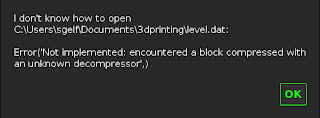
Click on 'Open...' and browse to the extracted files from your exported world from before and choose the level.dat and then click open. If you get this error: 
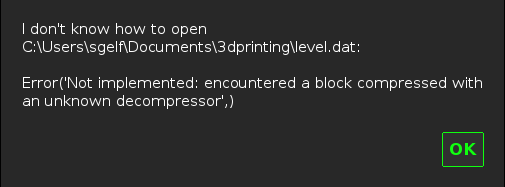

I believe it is linked in some way to the 'Blocks of Grass' template exporting in an 'odd way' and I haven't figured out the fix yet. However, all is not lost, you just need to head back to Minecraft:EE and make a copy of the world, using the 'Copy World' button, and then export that copy instead. That has worked for me most of the time. If that also fails, reach out on Twitter @EduElfie, or join the mentor Discord https://dicord.gg/7fSQBdx and ask in there, and we will see if we can resolve the issue properly.

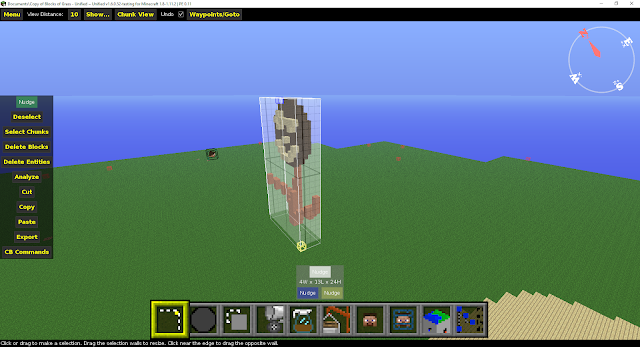
Hopefully once the world is open, it should look something like this:

OK, so your build might be a little more epic than my terrible, winking flower, but you get what I mean. Right?

Now for a little tutorial on moving around and navigating MCEdit. It is similar but also starkly different than Minecraft controls. WASD Space and Shift, still do similar things, but the mouse behaves completely different. Basically, the way I navigate is to hold down right click on the mouse, and that allows 'free' movement of the camera with the mouse, while moving around with WASD Space and Shift. Take a few minutes to try and have a go, and explore the movement, it is quite a jarring experience when it looks like Minecraft, but doesn't behave as Minecraft should! Once you are comfortable moving around, it is time to start selecting things.

To select something, it is a matter of getting your frame of view somewhere reasonable and left clicking on a block, and then left clicking another block to select a 3D rectangular prism. This was my first selection.

You can see that the entire flower is not within that selection area, and that is fine, we can 'pull' faces out to make sure we have everything selected. Below follows a 'snapshot' of each expansion I chose, and the frame of view I did it from. To expand the selection, hover your mouse over a face until the border of the face goes orange, then 'drag' it the direction you want it to be.

You can see in the image above, that I have moved my camera to be more side on, and pulled the front face out a bit so that it gets the face of the flower, instead of just the dark brown 'petals' of the flower. But you can see I am still missing a part of the 'orange wood' closest to my camera.

From this perspective, I now have everything selected, so time to move my camera (don't accidentally left click, it will undo your selection!). 

Moving my perspective around to the back of the build, you can see that I am missing the back part of the stem, and also the top part of the petals. Time to pull both the back and top faces of my selection so that I cover all of them.

Done! Now to check all sides again, just to make sure it is all within the selection box.

And it is, so now it is time to take this out of Minecraft and into something another program can read easily. Click the 'Copy' button on the left 'menu pane' and it will 'put' this copy in the top right corner of the screen.

You will notice a little 'Save' button up there, click that to save the copy as a .schematic file. Save it somewhere relevant, it defaults to /Documents/MCEdit/Schematics.

Now it is time to install the third, and final piece of software to make this process complete. This program reads Java Minecraft worlds, or .schematic files and can convert them to stl's for 3D printing. Mineways is a gem of a program, and entirely free, download it from here: http://www.realtimerendering.com/erich/minecraft/public/mineways/ 

When I open Mineways I get a whole heap of error codes, I believe this is because it is looking at my Java Minecraft saves, and it cannot open them because they are 'too new' a version of Minecraft. I hit 'OK' on all those errors until I come to this screen.

Now it is time to open our schematic file. Click on 'File' and then 'Open' (not 'Open World'), browse to your schematic that you saved before and press open. Because my build is so small, this is what it looks like on my screen.

Zoom in with the scroll wheel, pan by holding left click and dragging. My build is now centered in my viewing area. I should take the opportunity here to say that you don't have to export the entire schematic in the one stl file. You can get all students to build in the one area in the one world and export that entire area as a schematic, and then choose individual builds at this point for individual printing.

Now you need to select what you want to export for 3D printing. Right click and drag to select, it goes bright pink to show you where your selection is.
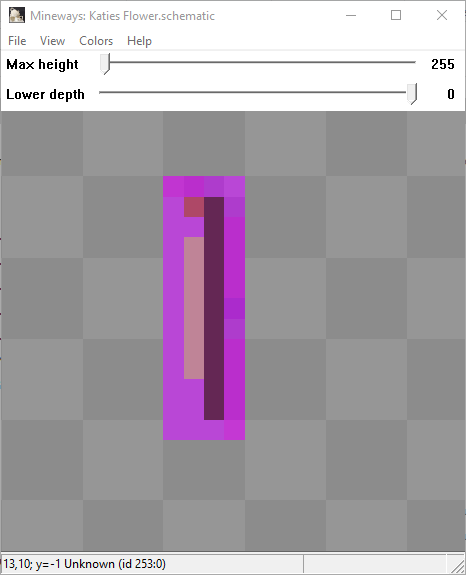

At this stage you can choose not to export all the way down or up from your schematic using the sliders at the top of the screen and changing the lower and upper bounds of the selection, but in this case, my schematic is only what I want to print anyway, so I can just press 'File', 'Export for 3D Printing'.

This brings up a 'where' dialogue box, so give your stl file a name, choose where you want to save it and MAKE SURE to change the save as type to a stl variety. 

I use ASCII text STL, but I was told " The other two binary STL file formats should also work, and are much more compact for transferring the data, so you may want to try them out instead." a while ago, but old dogs... new tricks.... you know rigt? You, however, may want to try the three different varieties (or any of the other file types if you want to delve into other uses) and see which works best for you. Once you hit save, a very, very scary window should appear.

While it looks scary, there is not a lot here that you need to mess about with, there are some key settings that you need to know about, but most can be left as they are. The three things to pay closest attention to are the 'Scale' in the top right corner of the window, The 'Delete floating objects' tick box in the middle of the right column, and the 'Weld all shared edges' tick box on the very right side of the window, again roughly in the middle.

Scale, you have a couple of options, you can either make the whole model a particular height, or make each block a particular physical dimension. Either works, and it is entirely at your discretion which you choose.

"Delete floating objects" - On export you'll be warned if there are "floating bits" such as disconnected tree leaves cut off by the volume selected. On by default, this option will get rid of these floating bits in the volume you're exporting. Turn it off if you're sure you want to export everything in your selection volume.

"Weld all shared edges" - Mineways will automatically add a block here and there if it sees parts that would be disconnected otherwise. However, by default it adds as few blocks as needed. Turning this option on ensures that all blocks that touch at only their edges will have additional blocks added to keep these blocks glued together. This makes the model stronger, but can change its look.

Once you have your setting correct hit that 'OK' button to save your stl file and then open that stl file in your 3D printing software. Hit print and enjoy your work!

That pretty much sums up all the steps. If you would rather see me blunder through this in a video, there is a tutorial video available here that steps through it all, however I need to update the links in the video description, as I haven't done that as of posting this guide: 

I hope you found this useful, if you need any more support, or anything doesn't make sense, please let me know in the comments below, via Twitter @EduElfie or on the mentor Discord https://dicord.gg/7fSQBdx Thanks for reading, and happy printing!!

Tuesday, 26 February 2019

Minecraft Worksheets

So, I have been pondering something for a while and something came up today on social media that really brought some clarification to some thoughts for me, but also muddied the waters a bit on some ideas I had been working on. Here goes!

I have been pondering about 'recreating/remaking/tweaking' some very old 'joke problem solving' sheets from an old 8 Plus book, printed in 1986, that I used to use in my math classes for some "fun" practice/reinforcement of particular concepts. These sheets had a joke or riddle as the overarching question, multiple reinforcing problems for the students to find the answers to, and those answers were related to a letter, and when combined all together you came out with the answer to the riddle.

It has been stewing the back of my mind for quite some time, and I revisited it just the other day, mostly because I finally remembered where the book was, looking at some of the sheets in the book, and seeing if I could apply the 'concepts' to Minecraft, and how I could get the kids 'practicing' these concepts in the virtual world.

My original (a few years ago) plan was to recreate the worksheet almost as is, in Minecraft, but give them the virtual world to practice the problem with. Then I thought about copyright issues and such and thought it might be better to make the questions literally about Minecraft, and to get the students to actively create the solution in world, and then decode the answer to the problem. Then today, my eyes fell upon this;


It really, really made me think. I think I must have been borderline crazy to think about putting worksheets in Minecraft that have no relevance to the Minecraft world. Like the problem above, it is a great problem, and I can see exactly the learning demonstrated by students as they answer the question, but it has absolutely no relevance to the Minecraft world... There is no cheese, or mice in Minecraft. 

While I have no idea about how the students worked within Minecraft to complete this activity, I feel like this question could have been reworded to be more suitable to the medium. For example; 

"A rectangular structure of dirt, with a base area of 24 blocks and a height of 4 blocks was left out for a few nights, and some Endermen stole some blocks. After a few nights, there was a 4 block square base and height of only 1 block left. How many blocks did the Endermen steal?"

Does this rewording change the math? Possibly a little, but if you really wanted them working with 'standard' units, you could easily say that each block was a cm cube or such, but the actual concept itself, I don't think it does. So... that leads to yet another question, is my question 'better' than the one pictured? I honestly don't think it is, however it is definitely more 'relevant' to the platform students are learning in. Does that make it better inherently? I honestly don't know.

The more I reflect on this, and write this post, the more 'lost' I become. That question (and many more like it) have likely been on worksheets handed to students for more years than I have been a teacher. Second to that, since that is clearly in Information Block from the old MinecraftEdu which hasn't been 'available' for purchase for quite a few years now, it has probably been used quite a few times in that context too. The question would have no relevance to me at any time, because mice are not really a problem here where I live, and I never grew up with mice eating any of my food, particularly considering we kept our cheese in the fridge.

So, with multiple students having answered this question on paper and many others just like it, over the last however many years, who are likely no worse off for doing so, why do I think that making it relevant to the platform, when using Minecraft is so important? What has made that question feel so out of place for me within this context, and more so than in the context of a worksheet?

I think it is most likely because I don't want teachers to make Minecraft boring, or just drill and kill like activities because it is a massive missed opportunity. Minecraft is a game, if teachers are going to consistently make it 'just a worksheet' then, I am pretty sure I have said this in a previous post, we are going to lose the opportunity to keep engaging students in a new and much more fun type of learning. 

I don't want to rehash all the same discussion from a previous post, so I am going to leave this thought right here, and will now go and re-think, yet again, my idea of getting problem solving activities, where students can actively build, interact, and solve mathematical problems into Minecraft in a fun way, using the actual game to help reinforce the concepts. 

As always, thanks for reading, and if you would like to leave a comment below, please do. Otherwise, if you would like to have conversations like this in 'real time' join the Minecraft Mentor Discord here: https://discord.gg/7fSQBdx or, if you would like to become a Minecraft Mentor yourself, all the details on how to join and be a part of that community can be found here: http://aka.ms/joinmee

Wednesday, 23 January 2019

Mini-games and Mechanics

So, I have been quiet again lately, not because I have nothing to share, unfortunately, it is mostly because I have been super busy. There are some things I am working on, which I am not allowed to share, but others, tied in, that I probably can. So I have decided to take the time (however long that is) to write this post detailing some of the work, and how I am pushing my own thinking, my practice, and making Minecraft do the work for me in some cases all the while making it easier for other teachers to pick up my worlds, and lessons, and run them in their own classroom.

Speaking of lessons, I have been working on this website here: https://fuse.education.vic.gov.au/pages/meeclassroomideas and being very clear on the curriculum links and instructions to try and help people get up and running. Whether you are in a Victorian government school or not, you are more than welcome to use any resources on that page in your own classroom.

Now to the 'fun' stuff, as you may, or may not know, with 1.7 Bedrock came scoreboard functionality, limited, but enough there for what I want to do, and used to do back in the MinecraftEdu days. So of course I have been exploring, dabbling, updating old builds and creating new ones for Minecraft: EE! But what exactly have you been doing you might ask....

Well, a mini-game, sort of. It is an archaeological dig experience, that will sit 'inside' a larger project (which is the one I am not allowed to share specifics of) and put students into the role of archaeologists, researching the history of a particular building site and coming up with some inferences about what the site was used for in the past. This has been months in development, and started with a rough sketch of disparate ideas and command block 'systems' into the massive conglomeration and automation of all of these mechanics and systems into one nice, not so neat, package.

The mechanics in this game are quite complex, and I am still in relatively early testing phases, particularly in terms of large student groups in the world. I need to make sure to get the right balance between students finding 'things' and not finding things, but the basic mechanics all appear to be working from my testing. Here are some screenshots of what the command block arrays look like, as well as some attempted explanations about what these actually 'do' to students in game.


These first 2 arrays control the 'display' space, and are set up (top image) to prevent students displaying non-artefacts, and (bottom) prevent the same artefact being displayed twice, as well as prepping the 'researcher' for the particular artefact displayed.


This whole array is a double up split in half, the left half allows students to 'find' artefacts at particular 'hotspots' in the dig site, while the right half is 'breaking' artefacts for students who dig too fast.


All the 'little bits' that control the dig speed, clone all the tools and other resources students need, as well as open and close the 'security' gate at the entry location.


This one is the 'array' of researchers, that get prepped and ready to 'drop' in on students and talk about the item on display. It ties in with the second picture, and knows which NPC to drop based on what artefact is put in the display frame.

There is an analysis array too, which consists of a hopper sorting system, and command block array, that takes a 'mystery' item that students find, and then analyses it for them.

The second project I have been working on just over the last couple of days is a completely automated question generator in Minecraft. Again using scoreboards. Instead of me coming up with a 'generic' list of set questions that students must answer to find out the slope of lines, or the y=mx+c equation of lines, getting Minecraft to generate random ones for students, based on the parameters I have set within the map.

Again, here are some screenshots of the arrays and what they do, but what I really like about this is the 'conversion' of scoreboard values, to text on signs. This has some pretty big implications for truly interactive and fluid world interactions based on students choices, answers, and overall progress 'through the quest line' of our learning tasks.


This array converts the score for 'building a' and 'building b' to text for the display.


There are 4 arrays like this, that convert from a score between 0 and 63 to the floor number on signs for both building a and building b and puts them on display for students.


This is the job-search mechanic, randomly assigns various scores and checks and balances all the scores to make sure that students get a 'reasonable' job to complete, lets them know when it is done searching.


This is the display for the job board, while not a command block array, this is the output of each of the other arrays shown above. Pressing the button to the left, starts the process, and populates a new job on the signs for students.

I have also been dabbling in some new 'future' opportunities available in Bedrock 1.8, which will hopefully soon be the base for M:EE. It allows us to add custom entities, with custom behaviours, textures and the works. Which means to create a bike, I don't need to take over the horse mob, I can literally create a mob that is a bike, make it rideable, with custom animations and everything!


Of course, having heard this, my own children have conspired to guilt me into making them a whole heap of animals for their own worlds, so I am in the process of creating, foxes, fairies, crocodiles, platypus and sharks, plus a few that I have likely forgotten, but surely will be reminded of. But it is all learning, and getting easier each time to get the base packs ready. The modelling and texturing are still my least favourite parts, but I am getting better at that too, when I have time to do it that is.

What really excites me about this is, firstly, the opportunity for students to create their own mobs or characters in their own worlds to support their demonstration of learning, but also it expands our opportunities as teacher content creators to create even more immersive environments for learning. As one example; trading could be done with any entity we create, fully customisable. Coupled with the scoreboard stuff already available I can see massive implications for 'automated' worlds and differentiation based on what students have, and have not done.

Well, that is a very broad update, there, of course, have been many other happenings, and things I should share, so I will try and take time and write them up as it happens, rather than sporadically as I have been. Thanks for reading, and as always feel free to leave a comment below.

Monday, 26 November 2018

Classrooms are FUN! Permissions are NOT!!

So, on Friday last week I had the opportunity to go into a classroom and run a lesson with a group of primary school students. I asked if I could record in-game footage, and classroom audio so that I could publish a video and guess what? I could, and did! That video is available on my YouTube channel (or below), and I have to say, it was a lot of fun to get back into a classroom and have the opportunity to teach students in Minecraft again. It is not the first time I have done it since I started my new role, but this is the first time the stars aligned, and I was able to record and review my lesson.


Going back through the over 90 minutes of footage and conversations was awesome, and something I forgot, having not done anything like this for a while now, was how much I say "alright" and "OK". It is so darn frustrating, but it is also such a great reflective tool. What I would change, what I need to do different, how the lesson plan needs a little adjusting here and there. I managed to take the over 90 minutes to just around half, so it is around 50 minutes worth of footage. Showing the ups, downs, and collaborative problem solving as things went awry with my plans. Highlighting another issue with flying into schools running things and flying out again, the resources, not that the school wasn't resourced well, they are amazingly resourced, but I needed different resources, which I assumed would be there, and in hindsight, that was pretty stupid of me, but we persevered and got there in the end!

We also found some issues with the map on the day, the settings are a bit off, and yet again the permission behaviours in Minecraft: Education Edition did not behave as I expected them to. I have no idea when, or even if, they have changed, but we live, learn and try to adjust. One thing I have been reflecting on, in light of the changes in the most recent version, is clear documentation, there is none that I have been able to find. So we are all flying blind, making it up as we go, adjusting things on the fly to reach our outcomes, and well, I think that this is just not good enough. The information about the differences between the faculty and student permissions when joining a world is specific to M:EE, and there is no information out there, or at least that I have found, on what these differences are.

With limited access to students, I don't have time to test everything, but with a clearly defined set of parameters, I could definitely tweak my worlds and lesson plans to suit. But more importantly, if I am struggling with permissions, and I have years of experience, what is a new teacher doing? Flying just as blind as me, only possibly without the expertise to tweak things to make them work on the fly.

I have gone through the Bedrock version history, and I am not sure when (or if) this stuff pictured below was added, I don't remember seeing it in version 1.4.0 of M:EE, but who knows whether I missed it or not. I think this has a pretty serious impact on the user experience when planning lessons for others to be able to run. We now have even less control over what happens when others run our worlds, or at least it appears that way. If we cannot 'guarantee' as best we can, the user experience when using our custom worlds created for learning, linked to outcomes, then what is the use of sharing them? The last thing I want myself, or anyone for that matter, to do is to share lessons that cannot effectively be run in a classroom due to world settings being incorrect, and if you watch the video, I already have, because the settings didn't behave as I expected.


Negatives aside, the log in issues have been resolved over here in Victoria, once we got the message through that there were still issues, which next time, will be a lot quicker as I now know the most proper process to make that happen for my teachers here. So with that lesson, and massive amount of fun done, I am now back to collating resources, linking them to my local curriculum and publishing them for my teachers to access. Our 'School Starter Pack' is due to arrive in schools within a week or so, so I really have my work cut out to try and get as many resources, across as many subject areas, and year levels as possible ready to go before they land.

Back to it, thanks for reading, if you have any comments, please feel free to leave them below, or on the YouTube video if that is a more appropriate location.

Thursday, 22 November 2018

Activity vs Lesson: A Day 2 Take Away

This is the post I promised weeks ago or was it a month ago now... who knows, but finally here it is for your reading pleasure. Enjoy, and please leave a comment below if this resonated with you, or your opinion is different, I would love to engage further around this idea.

I have spent countless hours mulling over the best way to on-board teachers to Minecraft in their classrooms and developing training to make this happen. It was extraordinary to run my first 'Day 2' training with a group of teachers here.

I have never seen the lights go on quite so quick as when I gave this group of teachers the choice between a set of carefully chosen activities from the suite of Minecraft:EE Activity of the week. I wanted to make sure the curriculum links could be clearly visible with a bit of prodding.

Without any instructions other than to complete the activity, and a time limit within which to do it in, off they went. They had a great time, who doesn't! After the time limit was up I started with my prodding, by asking the following questions:
"What is next after this activity?"
"What learning outcomes do you think it covers?"
"What could you discuss with students about this activity?"

It wasn't until that point that they really got the distinction between an activity and a lesson. Not only that, we kept going and had a discussion about how important it was for them, as the teachers in 'charge' of student learning, to be very clear in their own mind about what students are gaining, with regards to learning outcomes, from working in Minecraft.

What was great, is then we went into collaborative activities and showed the absolute value of collaborative work in Minecraft worlds, this is an activity I think should probably be in day 1, and I plan on doing so. I even did this at another event, in a 45 minute training session. Got groups of teachers who didn't know eachother, to join a world and work together on creating something. Then share what happened, what outcomes we could pull from it, and what the next steps may have been.

Back to the day 2 training group, we then, with some friendly advice and suggestions from years of developing Minecraft lessons, began to plan and develop their own lessons, linked to their own teaching, their own plans and their own classrooms.

Each and every participant had at least a half ready plan for implementation in a particular topic or lesson linked to learning outcomes by the time they left the training day. We are about due to catch up and discuss how these lessons went, or what stopped them coming to fruition and start the planning process again ready for next year.

It is exciting times here, and things are starting to gain solid traction. The most recent data set has 300 teachers across the state, using this with 24 students each, on average 7 times a month. This is all averages, and well, may mean very little, but if that is the 'average' it is absolutely astonishing, and something I am very proud to have been a part of.

Thanks for reading and as always feel free to leave a comment below.

Monday, 19 November 2018

Pleasing Statistics

I said a couple of posts ago, that I was going to start sharing some of the positives happening around Minecraft here, and this post is one of those shares. Also, before we get into it, I would like to thank everyone who read my previous posts and engaged with me, with offers of support, a person to talk to and for those conversations that continued the discussion. I really, and I mean, that, really appreciate your time and comments.

For the record, I am fine, yes, I have had a bad couple of weeks, but a lot of that had been taking up space in my head for far too long, and I felt I wasn't being true to myself, and sharing 'warts and all' of my Minecraft in education journey, as I have in the past. I want to reiterate to everyone, this was just one mans opinion, on one mans experience lately. I don't blame anyone, on the M:EE team, or the wider Minecraft in education community for this, it is what it is, and we take stock, reflect and move on. I am still here, and intend on still being here, sharing all the great, and not so great things about Minecraft in education from my perspective. Now, to the positive stuff!

As part of my role, I have had the pleasure of updating my resources for my teachers here, to reflect the curriculum outcomes, and making sure they work with the new version, updating them from MinecraftEdu has been a trip down memory lane, let me tell you! As I have shared these on the M:EE website, I have been using bit.ly links to track how much they are used, out of an interests sake. It is surprising to look at that data, from an objective perspective and try to make sense of it.

I will share some of the data, and what I think that it means, and why I think this data says awesome things about the teachers looking for content to use in their classrooms from the M:EE site.

Sheepish Probability World - 25 downloads
Sheepish Probability Student Worksheet - 25 downloads
Sheepish Probability Lesson Plan - 38 downloads

Animal Cell Student Worksheet - 17 downloads
Animal Cell Lesson Plan - 19 downloads
Animal Cell World - 17 downloads

These are the two I want to discuss right now, I will leave my third piece of content for a little bit, and come to that after we discuss this lot. I look at this data, and it pleases me, a lot. This tells me, that the majority of users searching through the site, look at the lesson plan, and then decide whether they want the world and student worksheet or not. This is brilliant, and exactly what I would hope for. I don't mind how many read the lesson plan and don't download the world, because it means it is not suitable for their class, or their learning outcomes. I would love to know whether it was just that it wasn't suited, or too hard, or too involved, or whatever, but I can only guess at the true reasons, and I am hoping it is just not relevant. I think this is absolutely amazing, if my guess is right!

Now here is the third piece of content I have on the M:EE website.

Exploring Contour Maps Lesson Plan - 55 downloads
Exploring Contour Maps World - 82 downloads

Now there is not only a difference in the total number of downloads (all three of the lessons were released within the same week), and I will explain that, but the data is also reversed, and I have a guess as to why. This lesson was highlighted in the October Minecraft Education newsletter, which brings a whole different audience to the table. These are not teachers hunting the site for something specific, these are people looking at highlighted content. They are not so much interested in the learning outcomes it seems, or the plan associated with the world, they are more interested in looking at the world. Which I find interesting, but cannot explain further than that.

What is interesting, for me at least, is I have not advertised these lessons anywhere but once on Twitter when they were first released, and ego aside, my reach on Twitter is not all that impressive. So, what do I take from this set of data?
  1. Teachers are searching the M:EE site looking for relevant content.
  2. These teachers are willing to explore deeply into lesson plans to determine whether it is suitable.
  3. If it is not suitable, they clearly head off and keep hunting, if it is suitable, they grab the world and other associated resources.
  4. I need to keep sharing my content to support teachers, because it is clear that some are finding my content, and they are finding it useful for their own classrooms.
That's it from me right now, if you have any comments or suggestions, please feel free to leave them in the comments section below. If you are tracking your own content, are you seeing the same kind of trend? Do you have a different opinion as to what this means? Thanks for reading!

Sunday, 18 November 2018

The Global Mentor Program - One Mans Opinion

This post was initially written directly after my previous post, in a very negative frame of mind, but it highlights my feelings about the current mentor program. Please bear in mind, the whole mentor program is a work in progress from the M:EE team perspective, so what I have experienced this year, will not continue (I hope) into next year, and they do have changes coming that I think will improve it, but I still think there is plenty of room for more edu-focused teachers to get involved, and I know this is something that is actually wanted by the M:EE team.

I mentioned in my last post why I initially joined the global mentor program; it was to help shape the way Minecraft: Education Edition developed, and from a desire to help others on their journey wherever they may be. This again, is a fairly negative post, so fair warning. Just my opinions and feelings right now.

Instead of being part of a community that is consulted on changes, or asked for suggestions on the next ‘iteration’ I have been helping 'brand new to Minecraft "Trainers"' skill themselves up by asking those in the community who learnt through trial and error, searching YouTube or just plain playing the game, using their own time to do so. These "trainers" are using the freely shared skills and knowledge of the community to bolster their training, and their paycheck. Look back at my previous post, where I talk about the time I am going to have to spend trialing multiple circumstances to determine what impact the global /wb change has on maps. This is a perfect example of the time I will freely give, and they will gladly benefit from. I am not sure how I feel about this if I am being honest, I want to help teachers use this in their classrooms, and at its most basic level, helping trainers, is in fact helping teachers, but it does feel like the community is being 'used' by these trainers, as they seem to give little back in return for the knowledge they are given.

We are not a consulted community, changes happen without any indication they are coming. We may, or may not get access to early betas to explore, of which I cannot normally partake in, because I work with too many schools and teachers running the current version, and normally they are not backwards compatible, and they are certainly not able to be installed side by side.

One of my biggest issues with the community as it stands, is any attempts to push people in the community to think deeper about the pedagogy instead of the 'shiny' and 'new' and 'engaging' aspects of Minecraft: Education Edition has fallen on mostly deaf ears. I think this is because a fairly large portion of the members are not teachers, but are trainers instead, but this is only a guess. I have been continuing to push my own thinking, sharing it as I go, and there is beginning to be a community of teachers who are exploring deeper, so this can only get better.

I spoke to Meenoo Rami, manager of the program about my feelings when she was in Melbourne a few weeks ago, I said "The mentor community is broken." her response, and rightfully so, was "No, it isn't, it just isn't providing you what you need." So, fair call, what do I need from the global mentor community?

At this point, what I need, most of all, is to be a part of a community of practitioners with whom I can push boundaries, discuss options, create amazing content and share the knowledge and resources freely. What I want from the community aligns, but is also a bit separate from that. I want to be part of a community that shapes Minecraft: Education Edition, a part of a community that pushes it beyond the current boundaries, a part of a community that supports one another freely and openly to grow the great possibilities I see Minecraft in classrooms creating. But instead, currently I get very little, I gain the relationships with other teachers willing to engage with me, but overall I feel a bit 'underutilized'. I give everything for free to the community, and instead of utilizing that skill and knowledge, I feel it is ignored, and they promote 'mentors' that are not actually part of the community at all.

They shone shining lights on two alleged mentors at Minecon Earth, neither of which has ever answered a question in the mentor Teams space, never engaged in a discussion and not been a part of the mentor community these last 12 months (and possibly longer). If you are going to promote the mentor program, at least choose some active mentors, not those who have taken the ‘badge’ and run away with it to promote themselves.

One of the maps demonstrated at Minecon Earth, is not available for anyone to use at the moment, and if history is anything to go by, it will not be made available for the good of the community, but will instead have a price tag attached, whether Microsoft pays this price tag or not is kind of irrelevant. I think the mentors should be producing content for the community, it is a volunteer program after all, if you don't have time, or the desire to share freely, don't join the mentor program.

In fact, one of these same ‘mentors’ told me I was ‘mistaken’ on social media when I made mention that the resources they have created are not freely available. I was happy to be proven wrong, but unfortunately I wasn't. Two weeks later, after I finally managed to get around the ducking and weaving and get a final answer on the question, I was told, in private, that those resources were not available for me to use.

Microsoft continue to promote the 'pretty' and the 'catchy' instead of the deep and meaningful learning that they should be. It appears that the focus is on new teachers, but it is not just new teachers out there, and new teachers at some stage stop being new teachers. It is not going to be long, before school administrators ask teachers using this in their classroom for evidence that it is supporting students to reach curriculum outcomes. If teachers cannot back up their use with solid evidence, they are going to get told they are no longer able to use it.

In my opinion promoting things like social and emotional learning is great, but it needs to be alongside curriculum linked, solid learning outcomes. Minecraft, in my classroom, was never, and in my opinion probably should never be, about ‘only’ the extras. I expect the same all of the teachers I work with, it is always about the learning outcomes, and the ‘other stuff’ is a solid bonus and make no mistake, those bonuses are amazing and well and truly worth it.

All the 4C’s, the social emotional learning, #SDGs and #TeachingTheToughStuff, awesome, and definitely something that that has value, but until the curriculum is shaped differently (a hope and dream at the moment) we are still, as teachers, accountable for the outcomes, and reporting of our local educational systems, and as such, I think we should put our focus there and use Minecraft to make the learning more valuable for students as best we can, within the curriculum we are bound to.

So, what am I saying? I don't know, if I am honest. I don't know what the future holds for Minecraft in education, but I can tell you, that if this debacle continues to grow at the scale and rate it has, I fear we will have lost the greatest opportunity to shift the educational paradigm away from what has been 'traditional' teaching for a world that it is no longer relevant to. There will be a saturation of 'shiny' and 'pretty' surface activities, with no real learning outcomes, and the deep learning lessons will be too hard to find, and even harder to get implemented in classrooms. Or, one of my biggest fears, the valuable, deep learning content will be behind pay walls, making it harder to fund in schools, harder to run, and more difficult for teachers to prove the worth of Minecraft in their classroom early on so they get the flexibility later to push a bit outside the 'norm' and start the change at the ground level.

Information is no longer the key, the ability to decode, decipher, and look at the massive amounts of information available to us and use it in unique ways to solve problems is the key to unlocking potential futures for our students. At this point we are still accountable to outcomes, and in the future I hope that we will be able to be much more flexible in the ‘what’ we teach and assess. Until we actually get there though, using Minecraft to cover only ‘non-curricular’ learning is a very dangerous place to be, and is risking the platform becoming useless in the eyes of administrators before it has a chance to shine.

I will remain a part of the global mentor program, if they continue to let me do so after these last two posts, as I still think I have a lot to offer the community, the community could also offer a lot for me, and I would still like the opportunity to share and shape the product as it develops. However my disappointment in what it has become this last 12 months remains. The mentor program, from my perspective right now is mostly a ‘publicity machine’ for Microsoft, and an ‘echo chamber’ of ‘pretty’ and ‘shiny’ activities that are not curriculum based. There is little discussion about the pedagogy, there is little discussion that takes Minecraft beyond its most basic of uses as a replacement of a worksheet, and I find this a massive missed opportunity, and one of the things I wanted the most out of the program, a community of like minded individuals, all supporting one another to better their practice.

So, if you are a teacher that is interested in growing your own, or others practice in this space, please consider joining, and making the community one that is focused on practice, pedagogy and curriculum alignment as well as pushing the educational uses of Minecraft (and games generally) in education. Leave a comment below, or reach out on Twitter @EduElfie and I will make sure to let you know what the process for application is once they make that information public. Thanks as always for reading, hopefully some more success stories coming up soon, I do have a lot despite my recent negativity, and a few draft posts that are much more positive than this, so stay tuned!